Breathe Simulate
The Breathe Simulate block is the heart of your Breathe Simulate library and is a fully parameterised physics based model. The details of the block output signals and block settings are described below.
Output signals
Potential Bus (φ)
| Signal Name | Description | Units |
|---|---|---|
voltModel |
The terminal voltage of the cell | V |
voltAnode |
The anode potential of the cell | V |
voltCathode |
The cathode potential of the cell | V |
ocvModel |
The Open-circuit-voltage of the cell | V |
ocvAnode |
The anode open-circuit voltage | V |
ocvCathode |
The cathode open-circuit voltage | V |
tempSurfaceModel |
The cell surface temperature | °C |
States Bus (x)
| Signal Name | Description | Units |
|---|---|---|
socModel |
The state-of-charge of the full cell | - |
socAnode |
The state-of-charge of the anode electrode | - |
socCathode |
The state-of-charge of the cathode electrode | - |
Flux Bus (J)
| Signal Name | Description | Units | Sign Convention |
|---|---|---|---|
currModel |
The cell current | A | Positive during charge, negative during discharge |
heatFlowModel |
Heat generated from the cell | W | Positive when heat is generated by Breathe Simulate |
Model parameters
The Breathe Simulate block contains three sets of parameters:
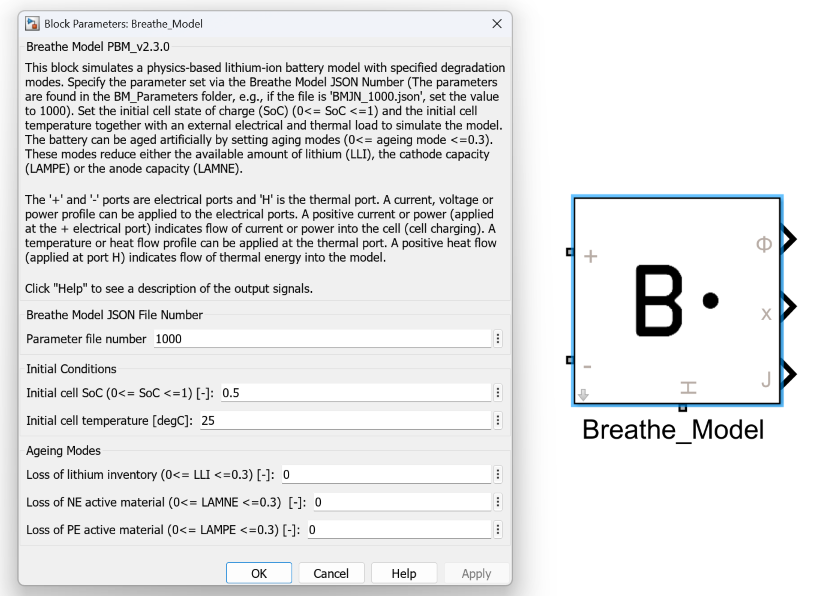
They can be specified by opening the Breathe Simulate block parameters window (double clicking on the model block).
Cell parameter set
The cell parameter set defines the core electrochemical, thermal, and geometric properties for each specific cell design, and can be easily selected or switched within the Breathe Simulate block. This modular approach enables rapid comparison between cell or quality scenarios, whether you’re evaluating different chemistries, form factors, production variability, or electrode design, without modifying or replacing the model block.
Each cell parameter set has a unique parameter file number for every cell design, which can be found in \Breathe_Model_Subpackages\BM_Parameters. See Working with cell parameters for more details.
Initial conditions
The initial conditions to be specified for every simulation are:
| Initial Condition | Description | Unit |
|---|---|---|
| State of Charge (SoC) | Cell state of charge, where 0 ≤ SoC ≤ 1 | - |
| Cell temperature | Starting surface temperature of the cell | °C |
They can be specified in the Breathe Simulate block parameters window, and programmatically by specifying variables in the block parameters pop up.
Ambient temperature vs. initial cell temperature
Ambient temperature and the initial cell temperature are not the same, they are decoupled.
This can enable some interesting simulations such as walking from inside to outside with a smartphone and assessing the impact on state of power.
Degradation modes
The degradation modes of the cell must also be specified for every simulation:
| Label | Description | Lower Bound | Upper Bound | Unit |
|---|---|---|---|---|
LLI |
Loss of Lithium Inventory | 0.00 | 0.30 | - |
LAMNE |
Loss of Active Material in the Negative Electrode | 0.00 | 0.30 | - |
LAMPE |
Loss of Active Material in the Positive Electrode | 0.00 | 0.30 | - |
Where a value of 0 represents no degradation and 0.30 represents the upper bound of degradation that can be simulated.
With all degradation modes set to 0.30, Breathe Simulate will behave like a cell at ~70% state of health.
Physical ports
Electrical ports
The electrical ports of the Breathe Simulate block are the blue ports labelled as + and -. These can be connected directly to other Simscape electrical physical systems, including other Breathe Simulate models, in the case of building up module simulations.
Being Simscape physical systems, these ports can be thought as analogous to the battery cell terminals, meaning connecting Breathe Simulate blocks + to + and - to - will simulate cells in parallel.
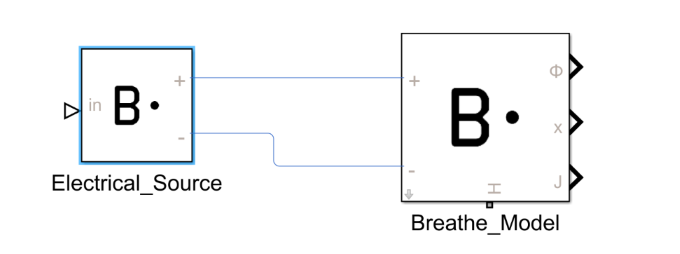
In this example, the electrical ports are connected to a Breathe Electrical Source block.
Thermal ports
The thermal port of Breathe Simulate is indicated by the orange H. This can be used to set a prescribed temperature or heat flow via Simscape thermal circuits.
This can be considered the thermal interface to the battery cell.
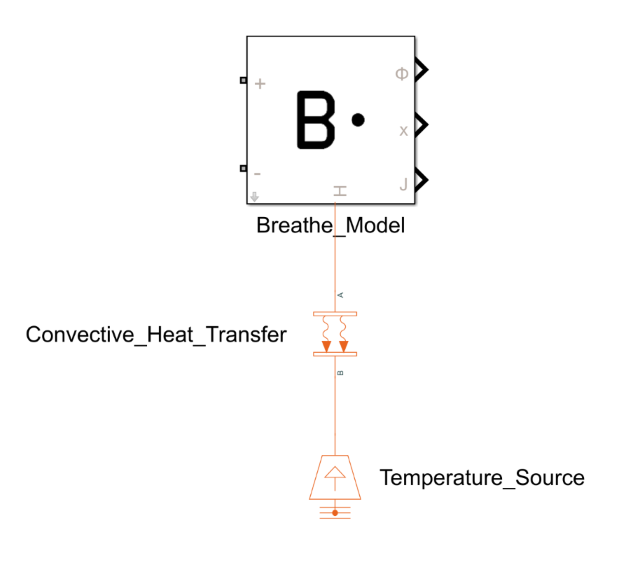
In this example, the thermal port is connected to a Simscape Temperature Source via a Simscape Convective Heat Transfer thermal element.
Model details for simulation settings
When simulating any battery model it is important to know the operating conditions under which the model is parameterised and valid over and the characteristics of the cell to help define the C-rates/P-rates and voltage limits.
Cell characteristics:
- Maximum voltage: To set the upper cut-off voltage and prevent overcharge
- Minimum voltage: To set the lower cut-off voltage and prevent overdischarge
- Nominal capacity: Defines the 1C rate value
- Nominal energy: Defines the 1P rate value
- Cell surface area: Required when setting the thermal boundary
Model operating limits:
- Recommended maximum and minimum C-rate limits.
- Recommended maximum and minimum applicable P-rate limits.
- Recommended ambient temperature limits for model operation.
With Breathe Simulate this information is found in the metadata section of the corresponding parameter set.
Worked example links
Refer to various examples provided in the Worked Examples section to see the use cases of Breathe Simulate.