CCCV cycling demo
The CCCV cycling demo shows how to use the Battery Cycler block included with Breathe Simulate to generate insights, such as:
- Add internal state insights to known empirical datasets
- Estimate & optimise cycler test conditions in fresh and aged cell states
- Evaluate model fidelity by comparing against known data
The demo simulates -the following protocol at 25°C:
- Constant Current (CC) discharge: 1C to minimum voltage
- Rest: 30 minutes
- Constant Current/Constant Voltage (CC/CV) charge: 1C Charge until C/90 to maximum voltage
- Rest: 30 minutes
- Repeat steps 1 to 5 three times
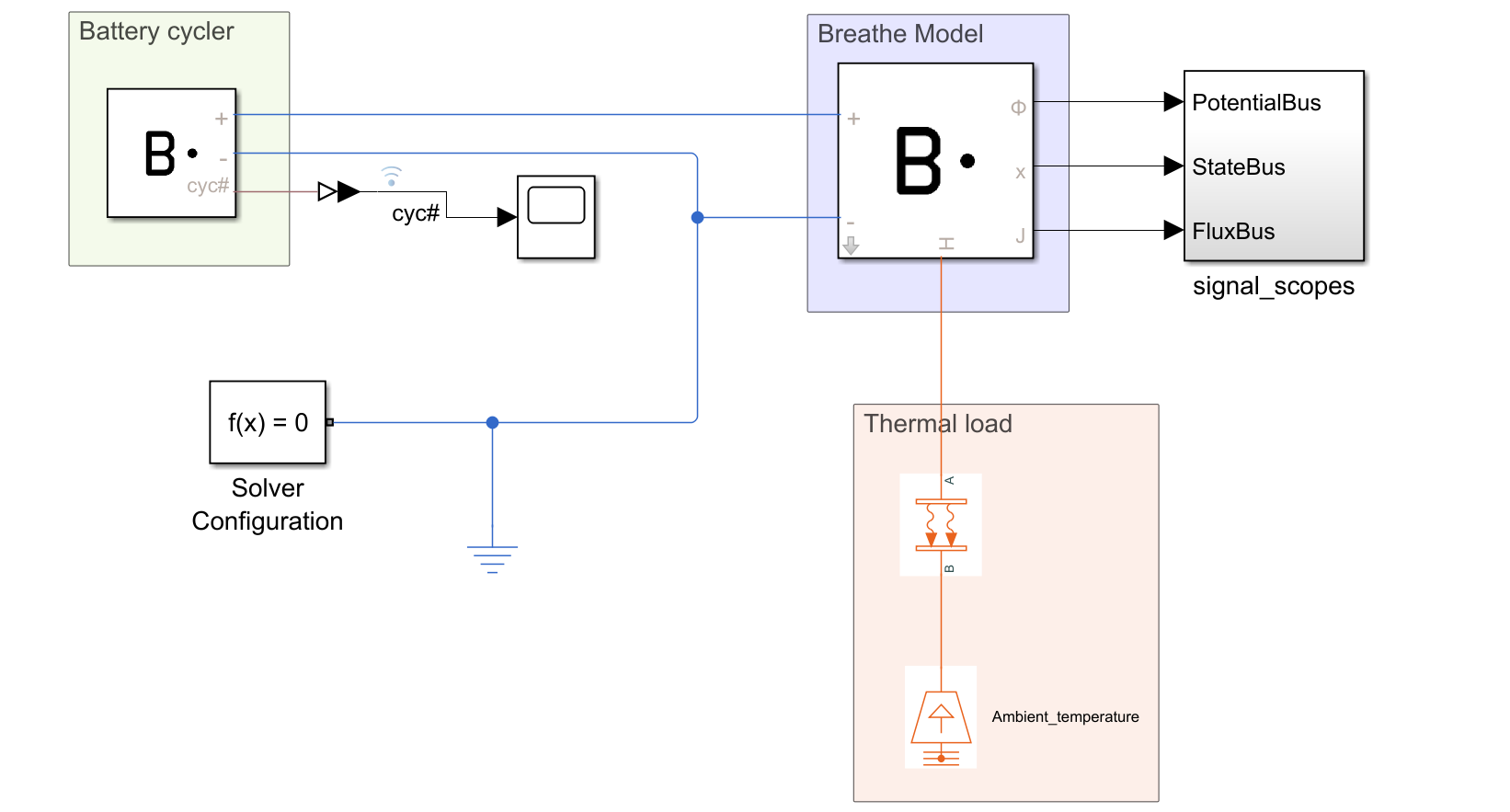
Accessing the demo
Navigate to the .../Examples/ folder in your Breathe Simulate download folder, and open the Demo_CCCV.slx file.
This demo is built as a Simulink Model, so interaction is handled via Simulink's graphical programming interface.
Simulating 3 cycles of CCCV charge/rest/discharge
To enable the simulation to correctly run, ensure the installation instructions have been followed. Pressing CTRL+D can quickly identify if the Breathe Simulate library has been correctly installed, as there will be no errors when initialising the simulation.
Running the simulation
The simulation can be run via the Simulate model button. In the Simulink toolbar, the button is located at SIMULATION > SIMULATE > RUN.
A progress bar will appear along the bottom of the Simulink window while the simulation is ongoing. Once complete, the status in the bottom left corner will indicate Ready.
Visualising results
The outputs of Breathe Simulate recorded during the simulation can be viewed using the Simulink Data Inspector. This can be accessed via the Simulink toolbar: SIMULATION > REVIEW RESULTS > Data Inspector tool.
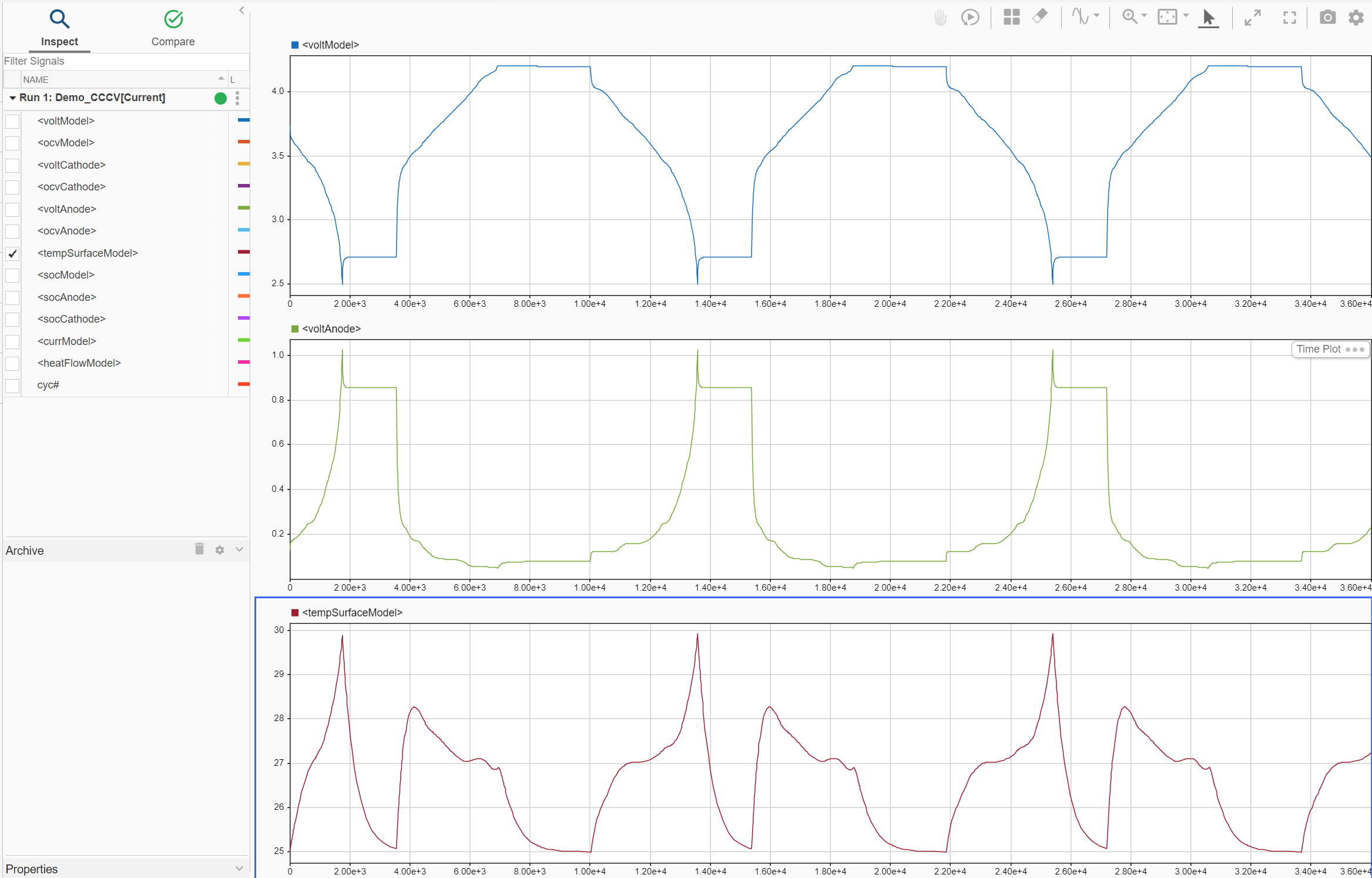
This is built in Simulink functionality, the detailed documentation for which can be found in MathWorks' Simulation Data Inspector documentation.
Key simulation components
There are 6 key elements to this demo that can serve as a way to get to know the fundamental elements of battery simulation:
- Breathe Simulate
- Battery cycler
- Thermal load
- Model outputs
- Terminating conditions
- Solver configuration
Breathe Simulate
Refer to the
Breathe Simulateblock documentation for details on the ports, outputs, and parameters.
In this demo, the Breathe Simulate electrical ports are connected to the Battery Cycler utility block, the thermal port is connected to the Simscape Convective_Heat_Transfer utility, and the outputs are organised in the signal_scopes block.
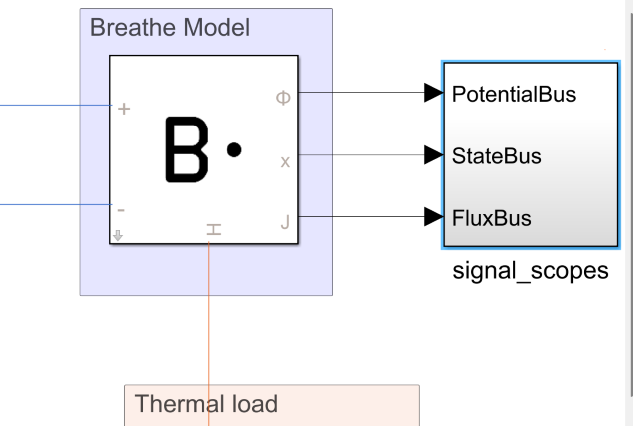
The Breathe Simulate block parameters are configured out of the box to be fully charged (SoC of 1.0), at room temperature (25°C), with no ageing.
These values are set within the Block Parameters context window of the Breathe Simulate block, and can be accessed by simply double clicking the Breathe Simulate block.
Default initial conditions:
| Parameter | Default Value | Unit |
|---|---|---|
| State of Charge (SoC) | 1.0 | - |
| Cell temperature | 25 | °C |
Default ageing state:
| Label | Description | Default Value | Unit |
|---|---|---|---|
LLI |
Loss of Lithium Inventory | 0.00 | - |
LAMNE |
Loss of Active Material in the Negative Electrode | 0.00 | - |
LAMPE |
Loss of Active Material in the Positive Electrode | 0.00 | - |
Signal_scopes: model outputs
The outputs of Breathe Simulate are organised in a Subsystem block for cleanliness of model canvas labelled signal_scopes. The outputs available can be viewed by double clicking the signal_scopes subsystem.
The outputs available are detailed in the Breathe Simulate documentation.
Battery cycler
Refer to Battery Cycler documentation for the detailed block documentation.
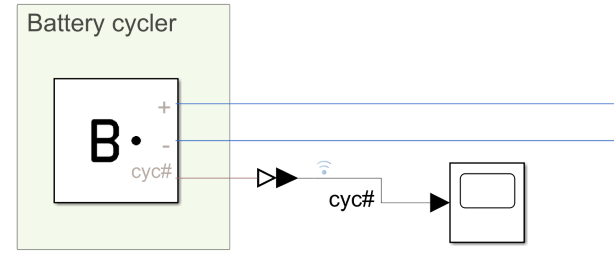
The battery cycler simulates:
- Constant Current (CC) discharge
- Rest
- Constant Current/Constant Voltage (CC/CV) charge
- Rest
The Battery Cycler block has seven parameters which must be defined:
| Parameter | Description | Unit |
|---|---|---|
| Charge current (> 0 denotes charging) | The CC charge current applied during the charging phase | A |
| Discharge current (< 0 denotes discharging) | The CC discharge current applied during discharging phase | A |
| Upper cut-off voltage | CC charging current is applied until this value is reached, then CV charging continues at this voltage | V |
| Lower cut-off voltage | Discharge current is applied until this value is reached | V |
| Current cut-off during CV hold | CV charging will continue until charging current has reduced to this threshold | A |
| Rest period after charge | Duration of rest period following the charging phase | s |
| Rest period after discharge | Duration of rest period following the discharging phase | s |
Defining the number of cycles conducted
The number of cycles to perform is not explicitly defined, but rather implicitly controlled through the Simulink Stop Time defined.
This is located under the SIMULATION tab of Simulink, in the SIMULATE section.
The number of cycles that have been simulated is logged, and is output by the Battery Cycler block. In this demo, it is labelled cyc# and is viewable in the Data Inspector.
Defining the cycling conditions
The cycling conditions can be set in Simulink by:
- Double clicking on the
Battery Cycler, revealing theBlock Parameters. - Under the
Parametersfield, specifying the value of each of the seven parameters (see table above). - Click
OKto save the selection and close theBlock Parameters.

Thermal load
This section defines the thermal environment with which the Breathe Simulate block is interacting. The key parameters needed to define this environment are (in order of appearance from top to bottom):
Convective_heat_transferAmbient_temperaturesource
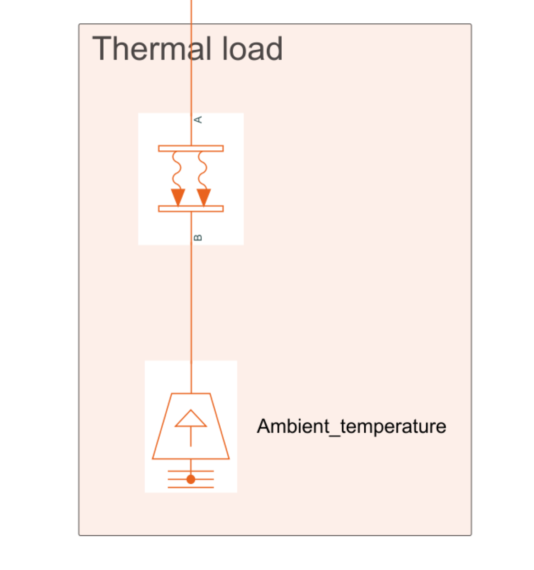
Both of these are part of the standard Simscape library.
Convective_heat_transfer
This dictates the heat transfer from the Breathe Simulate to the ambient heat source, modelling heat transfer via fluid motion.
Three parameters are needed to define this behaviour:
| Parameter | Default Value | Unit |
|---|---|---|
| Convection Type | Constant | - |
| Cell surface area | Cell dependent | m2 |
| Heat transfer coefficient | 35 | W/(K*m2) |
The Surface area of the cell model being used can be found in the meta information section of the corresponding parameter JSON file. For the MoliP45B cell example used here, the cell area value is 0.00537 m2.
This is a standard Simscape block. If further details are needed, refer to the MathWorks' Convective Heat Transfer documentation.
Ambient_temperature
Ambient_Temperature is a Temperature Source block that enables the definition of a constant source of thermal energy. It is an ideal source which remains constant regardless of the heat added/removed from the Breathe Simulate block.
The only parameter for this block is the constant temperature.
| Parameter | Default Value | Unit |
|---|---|---|
| Temperature | 25 | °C |
This is a standard Simscape block. If further details are needed, refer to the MathWorks' Temperature Source documentation.
Terminating conditions
Located in the Simulink toolbar under SIMULATION > SIMULATE > Stop Time
The simulation will run until the duration of the simulation reaches this value. For this simulation, this has been set to a value which will cause 3 full cycles to be completed.
| Parameter | Default Value | Unit |
|---|---|---|
| Stop time | 36000 | s |
Solver configuration
The recommended solvers to use with Breathe Simulate are variable-time and implicit solvers, e.g., ode15s, or daesol solver. Variable-time and implicit solvers offer stability and rapid simulations of the underpinning physics-based model equations. For fixed step solving, an implicit scheme is required such as backward Euler (ode1be) or ode14x with a recommended step size of 1 s.